

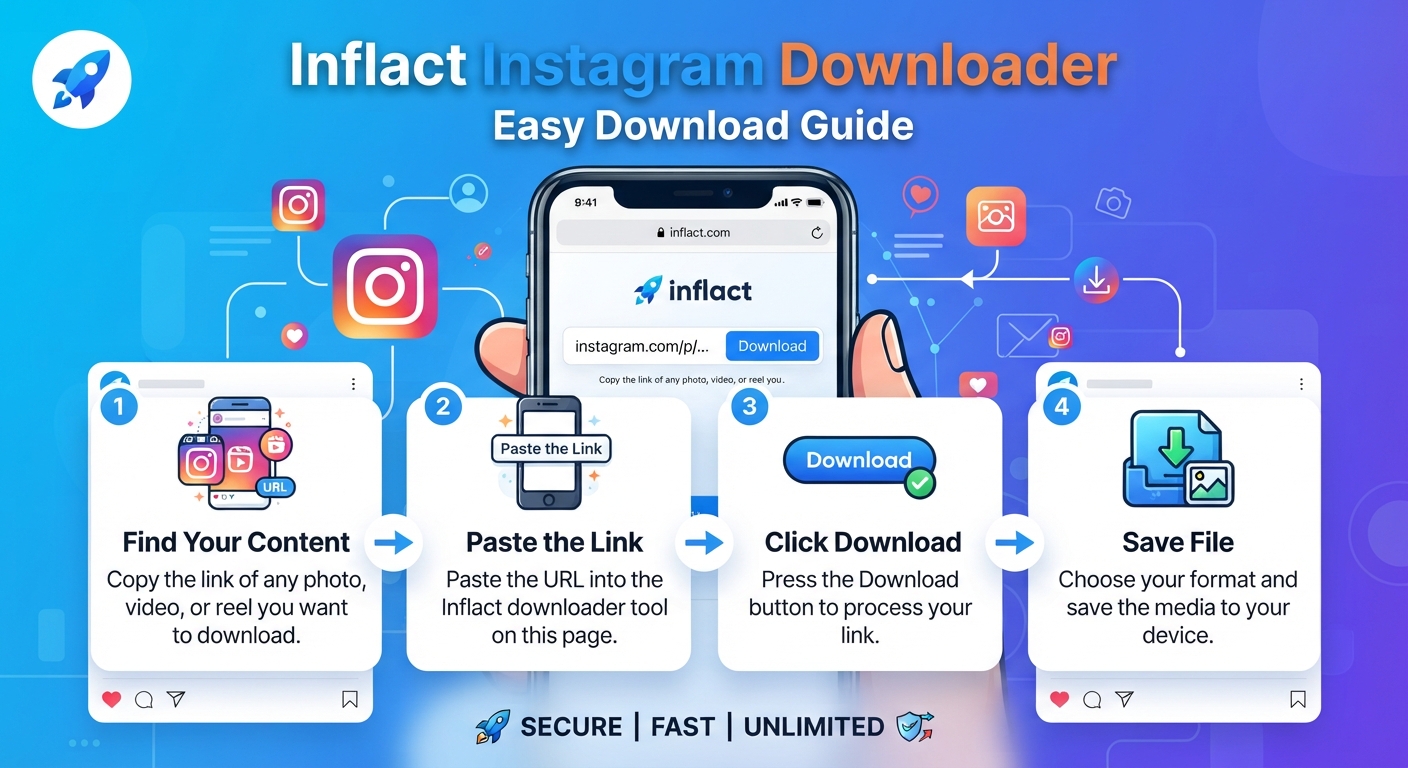
Instagram is packed with photos, videos, reels, and stories worth keeping — but the app itself gives you almost no way to save someone else’s content to your device. That’s where a dedicated Inflact Instagram downloader comes in. It’s a web-based tool that lets you grab public Instagram content in just a few clicks, without installing anything or logging into your account. This guide walks through what it does, how to use it, and what to keep in mind before you start downloading.
What Is Inflact Instagram Downloader?
Inflact Instagram Downloader is an online service built specifically for saving publicly available Instagram content — photos, videos, reels, stories, highlights, profile pictures, and even entire profiles. Rather than asking you to install a browser extension or a separate app, it runs entirely in your browser. You paste a link, the tool fetches the content, and you download it directly to your device.
The Inflact Instagram downloader is aimed at two kinds of users: casual people who just want to save a favorite post or a friend’s story before it disappears, and professionals — marketers, researchers, or social media managers — who need to archive content in bulk for analysis, backup, or reporting purposes.
Because it works from any modern browser, the Inflact Instagram downloader is compatible with Windows, Mac, iOS, and Android. You don’t need to sign into Instagram, and the tool is designed to keep your activity anonymous — the account you’re pulling content from has no way of knowing you used it.
Key Features Worth Knowing
Before jumping into the how-to steps, it helps to know what the tool actually covers:
- Photo and carousel downloads — save single images or multi-photo posts in their original resolution, without watermarks.
- Video and Reels downloads — grab Instagram videos and Reels in high quality with just a pasted link.
- Story and Highlight downloads — capture stories before they expire, and pull saved highlights from a profile.
- Profile picture downloads — view or save a user’s profile photo in full resolution rather than the cropped thumbnail Instagram normally shows.
- Full profile downloads — bulk-download all publicly available media from an account’s history in one pass.
- Cloud storage — logged-in users can route downloads into Inflact’s cloud instead of filling up local device storage, with files organized automatically by content type.
How to Use Inflact Instagram Downloader
Using the tool follows the same basic pattern no matter what type of content you’re saving. Here’s the general process:
Step 1: Find and Copy the Link
Open the Instagram app or website and navigate to the post, reel, story, or profile you want to save. Tap the three-dot menu (or right-click on desktop) and choose “Copy Link,” or copy the profile URL directly from your browser’s address bar.
Step 2: Open the Right Tool on Inflact’s Site
The Inflact Instagram downloader isn’t a single generic box — it has separate tools tailored to different content types: a Photo Downloader, Video/Reels Downloader, Story Downloader, Highlights Downloader, Profile Picture Downloader, and a Full Profile Downloader. Pick the one that matches what you’re trying to save.
Step 3: Paste the Link and Download
Paste the copied URL into the input field on the relevant page and click the “Download” button. The tool will process the link and display the available media — usually within a few seconds.
Step 4: Save the File
Once the content loads, click the download icon or button next to it. The file lands in your device’s default downloads folder (or Camera Roll on mobile). If you’re signed into an Inflact account, you can instead send it to your Inflact Cloud storage, where files typically stay accessible for a limited period.
Downloading a Full Profile
The process for grabbing an entire account’s public content is slightly different:
- Open the Profile Downloader tool.
- Enter the target account’s @username (no need to paste a full URL).
- Click “Search” or “Download Full Profile.”
- Once the tool loads the available media, click “Download All” to save everything at once, or select individual items.
Free access typically shows a limited preview of content (a handful of posts), with bulk or unlimited downloading reserved for a premium plan. If you regularly need to archive large profiles, it’s worth checking the current premium tiers directly on Inflact’s site, since pricing and limits can change.
Tips for a Smooth Download Experience
A few practical notes make the process go more smoothly:
- Double-check the account is public. Like most third-party tools, the Inflact Instagram downloader can only access content from public profiles — private accounts are off-limits unless you already have access to them through the app.
- Use the correct sub-tool. Pasting a Reel link into the Photo Downloader (or vice versa) won’t work well. Match the content type to the matching tool for the best results.
- Watch your storage. Bulk downloads, especially full-profile pulls, can add up quickly. Using the cloud storage option keeps your device’s memory free if you’re saving a lot of media.
- Respect copyright and privacy. Just because content is downloadable doesn’t mean it’s yours to repost or redistribute. Downloading for personal backup, research, or offline viewing is generally fine; reposting someone else’s content without permission or credit is a separate issue worth thinking through.
Why People Choose a Tool Like This
Instagram’s own interface makes it deliberately hard to save other people’s posts — there’s no native “download” button for photos or videos you didn’t post yourself. That’s a reasonable choice from a content-protection standpoint, but it leaves a real gap for anyone who needs to archive content, whether for a school project, a marketing report, journalism, or simply keeping a copy of something meaningful before it’s deleted or a story expires.
The appeal of the Inflact Instagram downloader is that it fills this gap without asking for much in return — no account creation for basic use, no software install, and support for nearly every content type Instagram offers. That combination of speed and coverage is why it comes up frequently whenever people search for ways to save Instagram content.
Final Thoughts
Whether you need to save a single photo, back up an old story, or pull an entire public profile for review, the Inflact Instagram downloader offers a straightforward, no-install way to do it from any device. The workflow boils down to the same three steps every time: copy the link, paste it into the right tool, and download. Just keep the platform’s public-content limitation and basic copyright etiquette in mind, and it’s a genuinely convenient option for anyone who regularly needs offline copies of Instagram media.








Leave a Reply